
Project Language Translator
AI Django-based
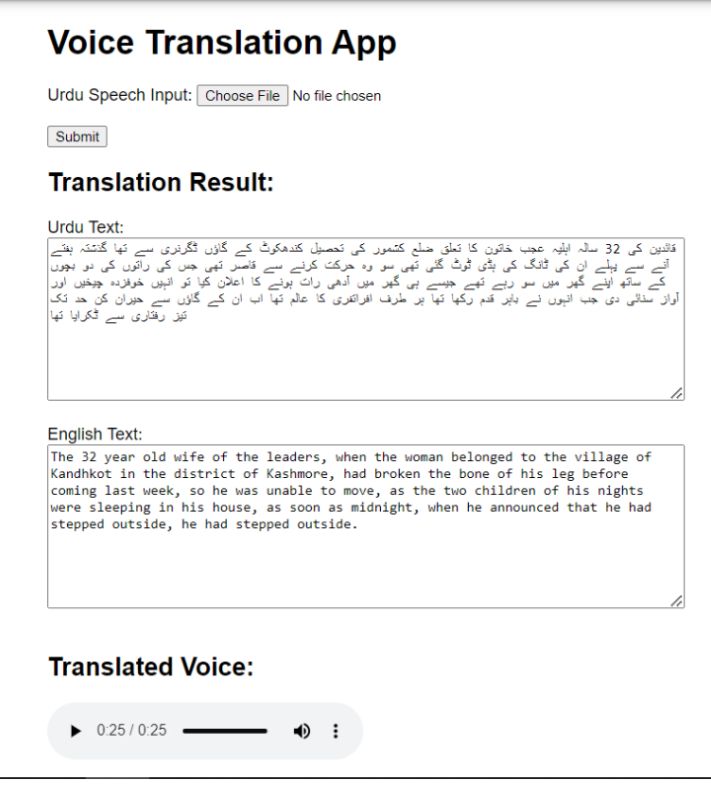
The Voice Translation App is a Django-based web application that allows users to convert spoken Urdu language into text, translate the text from Urdu to English using the IBM Cloud Language Translator service, and generate an English voice output for the translated text. The app utilizes three main modules to achieve these functionalities: speech-to-text conversion, language translation, and text-tospeech conversion.
Modules and Implementation:
a. Speech-to-Text Conversion: The Speech-to-Text conversion module is implemented using the SpeechRecognition library. Users can upload audio recordings in the form of files, such as WAV or MP3, from their devices. The uploaded audio file is processed using the SpeechRecognition library, which converts the speech into text. The extracted text is then passed to the next module for translation.
b. Language Translation:
The Language Translation module leverages the IBM Cloud Language Translator service (Dataset). The app accesses the service using an API key and URL. The Urdu-to-English translation is performed by making an API call to the IBM Cloud Language Translator service with the text obtained from the Speech-to-Text module. The response contains the translated text, which is then displayed in the app.
c. Text-to-Speech Conversion:
The Text-to-Speech conversion module utilizes the gTTS (Google Text-to-Speech) library. Once the
translated text is obtained, it is passed to gTTS to generate an audio file of the English voice output. The
generated audio file is saved and made available for playback.
Unit and Integration Testing:
Each module of the Voice Translation App can be individually unit tested for functionality and integration tested for proper communication and data flow between the modules. The following testing approaches can be applied:
a. Speech-to-Text Conversion:
- Unit testing: Verify that the SpeechRecognition library accurately converts the uploaded audio file into text.
- Integration testing: Test the integration between the Speech-to-Text and Language Translation modules by providing known audio recordings and validating the accuracy of the translated text.
b. Language Translation:
- Unit testing: Mock the API calls to the IBM Cloud Language Translator service and validate that th translation module correctly processes the input and returns the translated text.
- Integration testing: Test the integration between the Speech-to-Text and Language Translation modules by providing a known voice input and verifying the accuracy of the translated text.
c. Text-to-Speech Conversion:
- Unit testing: Ensure that the gTTS library correctly generates the audio file from the translated text.
- Integration testing: Verify that the generated audio file is accessible and playable in the app.
Implementation in Django:The Voice Translation App is implemented as a Django web application. Django provides a robust
framework for building web applications, handling requests, and rendering templates. The app consists of a single view that captures the user's voice input, performs the necessary translations, and displays the results. The HTML templates are rendered dynamically using Django's template engine, and the static files (CSS, JavaScript) are served from the appropriate directories.
Conclusion:
The Voice Translation App provides a seamless user experience by enabling voice input, translation, and voice output functionalities.
The implementation in Django allows for easy scalability and extensibility of the application. The app's modules, including Speech-to-Text conversion, Language Translation, and Text-to-Speech conversion, work together to create a comprehensive voice translation solution. The unit and integration testing ensure the functionality and reliability of each module, making the app a robust and user-friendly tool for Urdu-to-English translation.